

A financial planning app for everyday spending can make your money easier to understand by recording purchases, organizing expenses, and showing what remains after upcoming costs and savings. Some apps import transactions from connected accounts; others rely on manual entry. The key is to see both what you have spent and what still needs to be covered.
It’s understandable to want more than a list of purchases. A simple routine can help you spot recurring costs, track category budgets, and make monthly spending feel less uncertain. This article explains how expense tracking and categories work, what can happen to unused amounts at month-end, and how to choose a system that fits your habits. You’ll also see how planning can help you weigh everyday choices against upcoming bills, savings, and money available to spend.
Key Takeaways
- Choose whether to connect accounts or enter purchases yourself, based on how much automation you want and how you prefer to review spending.
- Learn what happens to unspent category amounts at month-end, and set rollover rules that reflect your own budgeting approach.
- Review automatically assigned categories so misclassified purchases don’t blur your picture of everyday spending.
- Use a clearer view of upcoming commitments and savings to make day-to-day choices with more confidence.
Budgeting Apps: What Are They & How Do They Work?
A budgeting app organizes spending information so you can compare purchases with your plan. Depending on the app, you may enter transactions manually or import them from connected accounts.
Connecting and Syncing Financial Accounts
Connect a bank account to import transactions, or enter purchases yourself. Some apps also support e-wallets and crypto wallets, while investment account aggregation can bring balances into one overview. Before connecting, check which account types the app supports and how often information syncs. Imported balances and transactions may help you analyze spending, but they don’t replace reviewing account activity.
Use unique passwords, secure Wi-Fi, and multi-factor authentication. Look for bank-grade encryption, avoid public networks, and monitor accounts for suspicious activity. Reviewing credit reports can also help you notice signs of identity theft.
Finding Apps for Daily Expense Tracking
There isn’t one best budgeting app for every US household. Compare how each app records daily purchases, sorts transactions, and displays monthly spending; then choose the method that fits your routine. Google Play and Apple’s App Store can help you compare app descriptions and user feedback, but focus on the features you’ll actually use.
Some apps are free, while others charge for access or extra features. Compare the payment model with what the app includes before choosing. A focused daily spending tracker may suit you better than a broad financial dashboard.
Choosing and Setting Up an App
Envelope budgeting assigns available money to categories, such as groceries or transport. Zero-based budgeting assigns every part of your income a purpose, including savings; the first method centers on category limits, while the second aims to account for the full plan. To set up either approach, connect the accounts you want to track, choose categories, and review the first imported transactions.
For a couple or household budget, consider whether shared access and expense tracking fit your needs. Decide which expenses belong in the shared view, then agree on how to record purchases and savings. Start with a manageable set of categories and adjust them after reviewing actual spending.
Expense tracking and monthly rollovers
Expense tracking shows how income is used across bills and everyday purchases. At month-end, decide whether unused category funds should carry forward, reset, or be adjusted manually.
Tracking Cash Flow and Expenses
Review income alongside spending to see whether upcoming costs fit your available cash flow. The figure illustrates why timing matters: expenses can exceed money coming in during one period, even if other months look different.
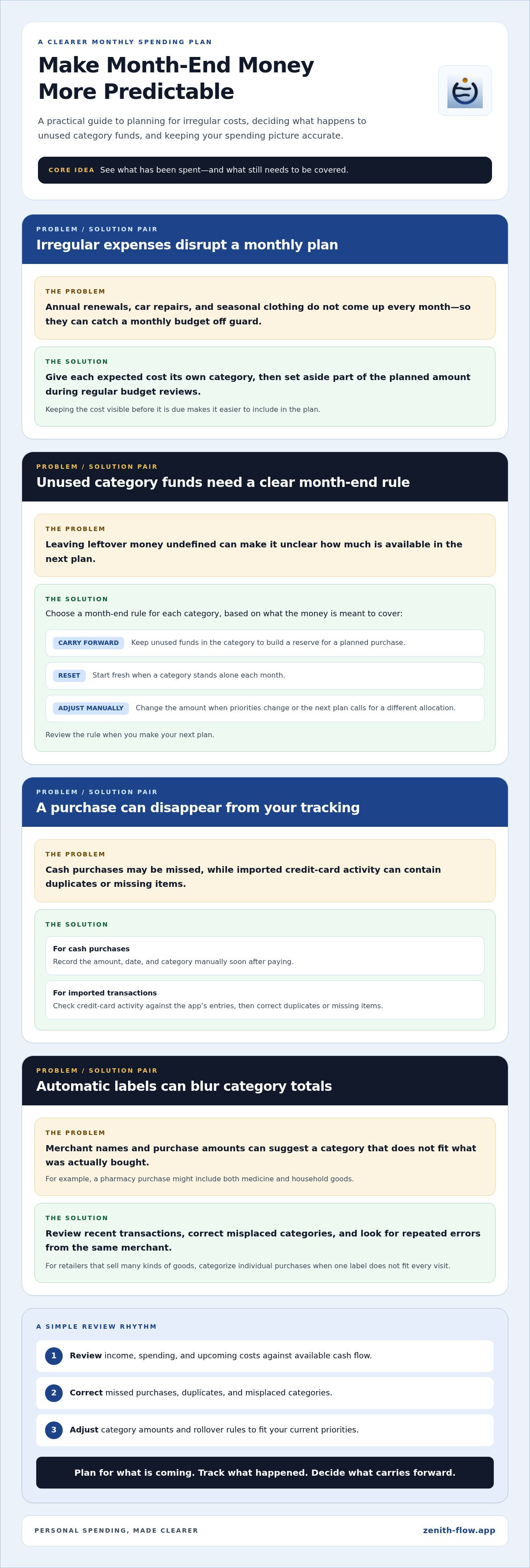
For each cash purchase, add the amount, date, and category manually. Record a coffee or market purchase soon after paying, so it doesn’t disappear from your tracking. Check credit-card transactions against the app’s imported entries, then correct duplicates or missing items.
Customizing Expense Categories
Start with categories that reflect real spending, such as groceries, transport, and household supplies. Rename broad labels or split them when more detail would help. For example, separate pet food from household supplies if you want to track it on its own.
Keep your category list manageable. If a category rarely helps you make a decision, combine it with a related one. With envelope budgeting, assign available funds to categories, review the balance before spending, and adjust it when your priorities change.
Planning for Infrequent Expenses
Annual renewals, car repairs, and seasonal clothing can disrupt a monthly plan because they don’t come up every month. Give each expected cost a dedicated category, then set aside part of the planned amount during regular budget reviews. This keeps the expense visible before it is due.
At month-end, decide whether each category should reset or roll over. Carrying unused funds forward can build a reserve for a planned purchase; resetting can work for categories that stand alone each month. Choose a rule that fits the expense and review it when you make your next plan.
If you want a simple way to keep upcoming commitments alongside spending, explore a daily spending planner.
Automatic transaction categorization
Automatic categorization gives imported transactions a starting label, such as groceries, transport, or bills. It can save sorting time, but reviewing the labels helps keep your spending picture accurate.
A transaction may show a merchant name and purchase amount. An app can use those details to suggest a category, but a pharmacy purchase, for example, might include both medicine and household goods. Check unfamiliar labels before relying on category totals to understand your spending.
Make a brief review part of your routine. Check recent transactions, correct misplaced categories, and look for repeated errors from the same merchant. If a retailer sells many kinds of goods, you may need to categorize individual purchases instead of applying the same label to every visit.
Set Rules and Limits That Fit
Spending rules can organize transactions by merchant, type, or category. For example, you might assign a recurring transit charge to transport and set a limit based on your plan. The rule saves repeated edits, while the limit gives you a point to check before another purchase.
Start with categories that help you make real decisions. A long list can slow down reviews, while broad categories may hide changes worth noticing. If one category repeatedly combines unrelated expenses, split it and use clear rules for new transactions.
Adjust Categories as Spending Changes
Category limits should reflect your current plan, not assumptions from a past month. If grocery costs rise because you’re hosting family, adjust the limit and note why. This helps distinguish a temporary change from a lasting shift in your budget.
Some people look at PocketGuard when comparing spending tools, but the useful test is whether its categories match your own routine. Review category totals alongside transactions, then rename, merge, or split labels that don’t help you understand your choices. Revisit those settings when a new bill, income change, or household routine alters how you spend.
Automatic labels are a starting point, not a judgment about your choices. Regular reviews turn categorized transactions into a clearer record of where your money goes and which limits need attention.
Benefits of financial planning
A financial plan puts everyday choices in the context of your wider finances. It connects today’s spending decisions with priorities such as paying bills, building savings, or setting money aside for a future goal. A budgeting app can make these choices easier to review by keeping planned spending and actual activity in view.
In the United States, 96% of people with a financial plan feel confident they’ll reach their financial goals. Also, 76% feel more in control of their finances. These figures describe people with plans, not a guarantee of a particular result. The practical value is having a clear way to see what your money is meant to do.
Use a short review to turn that overview into action. Compare income with essential expenses, then review flexible spending and savings contributions. Decide whether any available amount should go toward a current need or a longer-term goal. For example, if dining out costs more, you can adjust another flexible category while keeping the overall plan in view.
Regular reviews also make habits easier to recognize. A monthly check may show that small purchases take up more than expected, or that a regular bill has changed. Make one specific adjustment, then review its effect next time. A useful budget reflects your actual routine, not an ideal schedule you can’t maintain.
Planning can clarify how daily spending relates to investments and other future priorities. It doesn’t choose investments for you; it helps show what room your existing commitments leave. Keep those goals separate from routine expenses, and record what you intend to set aside for each.
For a calmer view of commitments, savings, and available spending, start planning your everyday finances.
Zenith Flow: Zenith Flow
Zenith Flow helps you see what you can spend after accounting for upcoming commitments and savings. It’s designed for iPhone, iPad, and Mac, bringing everyday financial planning into one clear view.
Its Disponibile figure shows what remains for spending after looking ahead up to three months. The Indice Zenith offers another view of your spending control, comparing you only with your own past months. You can record recurring expenses in In arrivo, use four free widgets, and access the Plus Simulator for planning scenarios. Essential features are free, while Zenith Flow Plus is a one-time purchase, not a subscription.
It may suit you if you want to plan around bills and savings, rather than only sort past purchases. Explore Zenith Flow’s spending planner when you’re ready.
Make Your Next Money Decision With Clarity
A useful financial planning app for everyday spending should support your decisions, not dictate them. Before a non-routine purchase, pause to consider what else that money could support. That moment can connect a passing choice with a priority you have already set.
Build a habit that feels easy enough to maintain. Choose a regular time to look ahead, notice what has changed, and decide whether your plan still fits your needs. You don’t need to perfect every detail to make progress. A clear next step is often more useful than a complicated system you rarely revisit.
If you’d like a steadier way to plan your spending, explore Zenith Flow. Take the next step at your own pace, and let your plan grow with your real life.
Frequently Asked Questions
How do you get your money into shape?
Start by listing your income, essential bills, debts, and savings priorities. Compare planned costs with recent spending, then choose one change you can maintain, such as setting aside money for an upcoming renewal. Keep the plan somewhere you’ll revisit, and review it after an income change or a new recurring bill. A steady routine matters more than perfect records.
What features should a financial planning app have for everyday spending?
Look for a clear view of available spending, upcoming commitments, savings goals, and category budgets. Consider how you’ll record purchases, whether recurring expenses can be tracked, and whether the summaries are useful without feeling cluttered. Zenith Flow uses manual entry: it doesn’t connect to banks or require an account, so you enter movements yourself.
Which budgeting apps connect securely to US bank and credit card accounts?
Connection support and security practices vary by app, so compare them directly before linking accounts. Look for clear details about encryption, multi-factor authentication, data handling, and account access, then use a unique password and monitor account activity. Zenith Flow does not connect to bank or credit card accounts; it never requests banking credentials, and you enter movements manually.
Which apps help users set spending limits and track bills in real time?
Choose an app that lets you set limits for the categories you care about and record due dates or recurring charges. How quickly transactions appear depends on the app’s data method and, where relevant, account connections. Zenith Flow records recurring expenses in its In arrivo list. You enter the amounts yourself, including the actual amount when a bill changes.
Are free financial planning apps safe, and how do they make money?
Free access alone doesn’t show whether an app protects your information or how it earns revenue. Review its privacy terms, security details, and any paid upgrades or other revenue sources before adding personal data. Zenith Flow’s essential features are free, and Zenith Flow Plus is unlocked with a one-time purchase. Zenith Flow doesn’t require an account or banking credentials.
What privacy and security risks should users consider with budgeting apps?
Consider what information an app collects, where it is stored, and whether it connects to financial accounts. Account connections can expose sensitive data if access or login details are compromised; manual entry avoids sharing banking credentials but still requires protecting your device. Use a device lock, unique passwords, and secure Wi-Fi, and review account activity for unfamiliar transactions.


